


AR Draw Sketch - Trace & Paint

Installs
5K+Category
Art & DesignContent Rating
Everyone
Screenshots
Editor Reviews
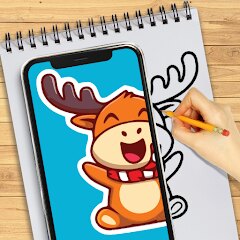
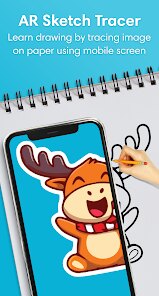
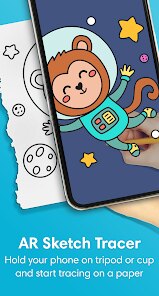
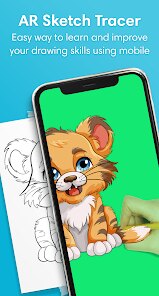
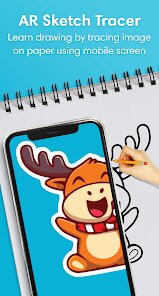
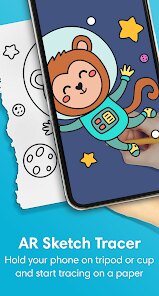
MØ Studios, a relatively young but ambitious mobile game developer, has carved out a niche for itself with AR Draw Sketch - Trace & Paint, an augmented reality drawing app that blurs the line between digital art and physical reality. The game, technically classified as an educational creative tool rather than a traditional action-packed title, leverages AR technology to project a reference image onto any flat surface, allowing players to trace it with real paper and pen. This innovative concept is paired with a minimalist art style that prioritizes functionality over flamboyance, using clean, unobtrusive interfaces that keep the focus on the player's own creation. The sound effects are subtle, limited to gentle notification tones and a soft shutter click when capturing progress, which helps maintain a meditative atmosphere. The game has no traditional storyline; instead, it offers a narrative of personal artistic growth, as players move from tracing simple outlines to layering complex shades and textures.
A standout gameplay technique is the "Ghost Layer" feature, where you can adjust the opacity of the AR projection to match your skill level—crank it up for a faint guide or down to full visibility for absolute clarity. Another clever touch is the "Pause and Rotate" mechanic, which freezes the AR image in space, letting you walk around your workspace to study angles or adjust your posture without losing the guide. However, the app is not without flaws. The AR tracking can be finicky in low light, occasionally causing the image to drift or flicker, which is frustrating during detailed work. Additionally, the free version restricts access to the full gallery of reference images, pushing players toward a subscription model that feels a bit steep for a tool that essentially digitizes a tracing lightbox.
Overall, AR Draw Sketch - Trace & Paint is a solid entry for beginners and hobbyists who want to learn proportions and line work without investing in expensive gear. It turns any desk into a studio, and the satisfaction of seeing your hand-drawn replica of a complex image come to life is genuine. While hardcore digital artists might find the features too basic, the app succeeds in making art accessible, proving that sometimes the best "game" is the one that teaches you a real-world skill. Just be ready for occasional AR hiccups and a nudging paywall.
How to play?
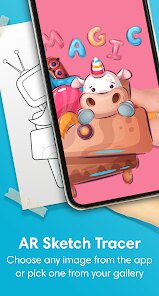
🖼️ Step 1: Launch the app and tap "New Canvas." Select a reference image from the built-in gallery or your phone's camera roll. Keep it simple for your first try—a fruit or a cartoon character works best.
📱 Step 2: Point your phone's camera at a flat, well-lit surface like a table or a sheet of paper taped to a wall. The app will scan the area and project the chosen image onto the surface in real-time via AR.
✏️ Step 3: Place a plain sheet of paper over the projected image. Adjust the AR image's size and position using pinch-to-zoom and drag, ensuring it aligns perfectly with your paper. Lock the image by tapping the "Pin" icon.
🎨 Step 4: Grab a real pencil or pen. Start tracing the basic outlines first—the AR ghost layers make this intuitive. Move slowly; the tracking is stable but jerky motions can desync the projection.
⏸️ Step 5: For tricky details, tap the "Pause" button to freeze the AR image. This stops live tracking, allowing you to lift your device or reposition your hand without losing the guide's position. Tap again to resume.
📸 Step 6: Once your sketch is complete, tap the camera icon to capture your physical drawing through the AR overlay. The app saves this photo to your in-app gallery, which doubles as a progress log.
🧽 Step 7: Use the "Erase Guide" feature to remove the AR projection from the saved photo, leaving only your physical sketch visible. Share it directly to social media or export the clean image to your device to show off your work.
Download the App
Online Games








Disclaimer
1 . Leogame does not represent any developer, nor is it the developer of any App or game.
2 . Leogame provide screenshots, historical version Apk, links and other information, which we collected from Google Play. We will also add our own reviews to provide users with more information to choose.
3 . All trademarks, registered trademarks, product names and company names or logos appearing on the site are the property of their respective owners.
4 . Leogame abides by the federal Digital Millennium Copyright Act (DMCA) by responding to notices of alleged infringement that complies with the DMCA and other applicable laws.
5 . We guarantee the security of apk files downloaded from our site and also provide the official download link at Google Play Store and App Store.
6 . If you are the owner or copyright representative and want to delete your information, please contact us [email protected].
7 . All the information on this website is strictly observed all the terms and conditions of Google Ads Advertising policies and Google Unwanted Software policy.